
VDK-80: The TRS-80 Virtual Disk Kit

Many TRS-80 floppy disks have been preserved until these days through data conversion processes which create "disk images". Such images are stored in specially formatted PC files that can be used in emulators to recreate faithful experiences of 30-year-old computers.
In February 2009 I started working on a program which allows the easy management of TRS-80 floppy images at the file level. Almost 4 years later, all I can say is that the code is still under development, but it is already capable of interpreting nearly all operating systems and image formats known for the TRS-80 model I, III and 4.
How would this be useful? In the 1980's there was a considerable number of operating systems available in the market and usually their file systems were incompatible with each other. In some cases, even between succeeding versions of the same operating system. Transferring files among such disks wasn't an easy task. Some people still have documents of personal value in these disks and I thought I could help them recover part of their history.
What does it do?
VDK-80 is a command-line Windows program which requires no installation whatsoever. If you are looking for a concise features list, there you go:
- Shows the disk directory, the disk name, the files' contents and the disk sectors
- Supports reading, writing, renaming or deleting single files or groups of files
- Supports all known TRS-80 model I/III/4 operating systems, except CP/M
- Supports all known floppy image formats: JV1, JV3 and DMK
Technicalities
When I started this project in 2009 I was missing the thrill of the old days, which I think explains some "odd" design choices I made, like writing the software in assembly language with object-orientation to address an unusual problem like reading very old computer disks. My first impulse was to work with real TRS-80 floppies, but then Ira Goldklang convinced me that a software to handle disk images would be of more value.
The code is built in modules, or "classes" in OO jargon. There are two main groups of modules which share the same features: one is the Operating System Interface and the other is the Virtual Disk Interface. The latter is responsible for "decoding" the file format and presenting the data as standard sectors to the upper layer. The former handles how each operating system stores its files and then reassembles the sectors into files when requested by the User Interface.
The picture below ilustrates the relationship between the specialized modules and the program's interfaces:
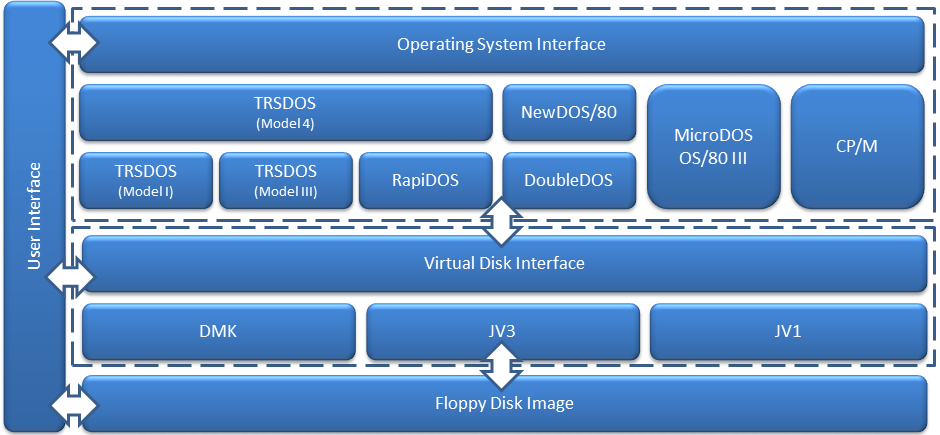
The user interface is currently command-line but the final version should have a graphical interface much more friendly. It will be possible exchange files between disks just dragging and dropping them from one window to another, for example.
How to use it
In this section I'll show how to perform a variety of operations with the program. In the examples below, I assume that you have placed the VDK-80 executable file in a directory of your computer and that you have added such directory to your PATH environment variable, allowing us to run the program from any other directory.
Getting help
The VDK-80 does a good job identifying disk formats and operating systems automatically, but there are times where a tweak may be needed. If you need help remembering which switch does what, just type:
C:\>v80
VDK-80, The TRS-80 Virtual Disk Kit v1.5 Written by Miguel Dutra (www.mdutra.com) Icon by Marco Martin (www.notmart.org) Syntax: V80 [switches][source_filespec] [target_filespec] Commands: -l List directory (default) -r Read files -w Write files -n Rename files -k Delete files -f Dump file contents -d Dump disk contents Options: -s Include system files -i Include invisible files -x Show extra information -p Skip the disk parameters check -c Skip the directory structure check -g Skip the GAT auto-fix in TRSDOS system disks -b Read as much as possible from bad files -ss Force the disk as single-sided -ds Force the disk as double-sided Disk Interfaces: -dmk Force the DMK disk interface -jv1 Force the JV1 disk interface -jv3 Force the JV3 disk interface DOS Interfaces: -cpm Force the CP/M system interface (INCOMPLETE) -dd Force the DoubleDOS system interface -md Force the MicroDOS/OS-80 III system interface -nd Force the NewDOS/80 system interface -rd Force the RapiDOS system interface -td1 Force the TRSDOS Model I system interface -td3 Force the TRSDOS Model III system interface -td4 Force the TRSDOS Model 4 system interface
The commands have been separated in groups just for the sake of organization, because they can be used in any order in the command-line, either before, between or after the files names.
Listing the disk directory I
If you just type the program's name along with a file name, the VDK-80 will list the disk directory, excluding system and invisible files. The listing contains the file name and extension, the file size in bytes, the file date formatted as yyyy/mm/dd and the file attributes as "SIMP", meaning: System, Invisible, Modified, Protection (0-7).
C:\>v80 td13.dmk
VDK-80, The TRS-80 Virtual Disk Kit v1.5
Written by Miguel Dutra (www.mdutra.com)
Icon by Marco Martin (www.notmart.org)

Listing directory contents:

Filename	    Size	Date		Attr
----------------------------------------------------
LPC/CMD     	     256	1981/05/00	---0
MEMTEST/CMD 	    2048	1981/05/00	---0
HERZ50/BLD  	      40	1981/05/00	---0

Total of 2344 bytes in 3 files listed.

The operation completed successfully.
Listing the disk directory II
As previously mentioned, you can tweak the program's behavior by adding some of the above-listed arguments in the command-line. In the following example, the VDK-80 is requested to show the identified disk format and operating system (-x), and then list only files with a CMD extension (*/CMD), including system (-s) and invisible (-i) files.
C:\>v80 td13.dmk */cmd -i -s -x
VDK-80, The TRS-80 Virtual Disk Kit v1.5
Written by Miguel Dutra (www.mdutra.com)
Icon by Marco Martin (www.notmart.org)

VDI: DMK (40:1:18,DD)
OSI: TD3 (TRSDOS,02/20/99,00)

Listing directory contents:

Filename	    Size	Date		Attr
----------------------------------------------------
BASIC/CMD   	    5120	1981/05/00	SI-6
CONVERT/CMD 	    2560	1981/05/00	SI-6
XFERSYS/CMD 	    1024	1981/05/00	SI-6
LPC/CMD     	     256	1981/05/00	---0
MEMTEST/CMD 	    2048	1981/05/00	---0

Total of 11008 bytes in 5 files listed.

The operation completed successfully.
VDI stands for Virtual Disk Interface and DMK is one of the three disk formats supported by the program (JV1, JV3, DMK). The numbers between parenthesis are formatted as TT:S:SS,DD, representing the number of tracks, sides, sectors per track and disk density (SD=Single, DD=Double, MD=Mixed).
OSI stands for Operating System Interface and TD3 is the module representing the TRSDOS Model III. The data between parenthesis are the disk name, disk date and the DOS version byte, as recorded in the GAT.
Reading files from the disk
If you want to copy all disk files to the current folder, just type:
C:\>v80 td13.dmk -r
VDK-80, The TRS-80 Virtual Disk Kit v1.5
Written by Miguel Dutra (www.mdutra.com)
Icon by Marco Martin (www.notmart.org)

Reading files from disk:

LPC/CMD      -> .\LPC.CMD   	     256 bytes	OK
MEMCHECK/CMD -> .\MEMCHECK.CMD	    2048 bytes	OK
HERZ50/BLD   -> .\HERZ50.BLD	      40 bytes	OK

Total of 2344 bytes read from 3 files.

The operation completed successfully.
Writing files to the disk
To copy a file from the current folder to the disk, type:
C:\>v80 td13.dmk -w readme.txt
VDK-80, The TRS-80 Virtual Disk Kit v1.5
Written by Miguel Dutra (www.mdutra.com)
Icon by Marco Martin (www.notmart.org)

Writing files to disk:

C:\README.TXT -> README/TXT     291 bytes OK

Total of 291 bytes written in 1 files.

The operation completed successfully.
Renaming files
To rename a file, type:
C:\>v80 td13.dmk -n memtest/cmd memcheck/cmd
VDK-80, The TRS-80 Virtual Disk Kit v1.5
Written by Miguel Dutra (www.mdutra.com)
Icon by Marco Martin (www.notmart.org)

Renaming files:

MEMTEST/CMD  -> MEMCHECK/CMD	OK

Total of 1 files renamed.

The operation completed successfully.
Deleting files
Suppose you want to delete all files with a BLD extension from the disk. In that case, you would type:
C:\>v80 td13.dmk -k */bld
VDK-80, The TRS-80 Virtual Disk Kit v1.5
Written by Miguel Dutra (www.mdutra.com)
Icon by Marco Martin (www.notmart.org)

Deleting files:

HERZ50/BLD  	OK

Total of 1 files deleted.

The operation completed successfully.
Dumping a file's content
The program can show a file's content as hex bytes:
C:\>v80 td13.dmk -f lpc/cmd
VDK-80, The TRS-80 Virtual Disk Kit v1.5
Written by Miguel Dutra (www.mdutra.com)
Icon by Marco Martin (www.notmart.org)
Dumping file contents:
01 5A 00 70 2A 26 40 01 C2 03 AF ED 42 C2 2D 40 .Z.p*&@.Â.¯íBÂ-@
2A 11 44 22 36 70 22 46 70 22 4D 70 01 2A 00 B7 *.D"6p"Fp"Mp.*.·
ED 42 22 11 44 23 22 26 40 11 2E 70 EB ED B0 C3 íB".D#"&@..pëí°Ã
2D 40 79 E6 7F 4F CA 4B 04 3A 57 70 FE 0C 28 0F -@yæOÊK.:Wpþ..(.
FE 0D 28 0B FE 0A 28 07 79 32 57 70 C3 C3 03 79 þ.(.þ.(.y2WpÃÃ.y
32 57 70 FE 0D CA 2A 04 C3 C3 03 0D 02 02 00 70 2Wpþ.Ê*.ÃÃ.....p
21 E6 47 CD B9 43 21 54 48 CD B9 43 E1 5C CD 9C !æG͹C!TH͹Cá\Íœ
43 5D CD 9C 43 CD CA 43 11 00 30 3E 07 32 08 44 C]ÍœCÍÊC..0>.2.D
CD FE 43 E5 21 19 48 CD B9 43 21 6D 48 CD B9 43 ÍþCå!.H͹C!mH͹C
E1 3A E8 37 4F A8 B7 ED 42 B7 ED 42 5C CD 9C 43 á:è7O¨·íB·íB\ÍœC
5D CD 9C 43 CD C7 43 21 49 49 CD B9 43 C9 D5 F5 ]ÍœCÍÇC!II͹CÉÕõ
7B 07 07 07 07 CD AD 43 7B CD AD 43 F1 D1 C9 E6 {....ÍC{ÍCñÑÉæ
0F C6 90 27 CE 40 27 CD CC 43 C9 F5 7E FE 03 28 .Æ'Î@'ÍÌCÉõ~þ..(
06 CD CC 43 23 18 F5 F1 C9 CD CA 43 3E 0D D5 FD .ÍÌC#.õñÉÍÊC>.Õý
E5 F5 FE 09 28 17 CD 33 00 FD 21 11 4A FD 34 00 åõþ.(.Í3.ý!.Jý4.
FE 0D 20 04 FD 36 00 00 F1 FD E1 D1 C9 C5 3A 11 þ. .ý6..ñýáÑÉÅ:.
Total of 256 bytes dumped.
The operation completed successfully.
Dumping all disk sectors
See a disk's structure, sector by sector, can be very useful to diagnose several kinds of problems. Sometimes you find issues in the boot sector, in the directory or other important areas that may be causing access errors.
C:\>v80 td13.dmk -d
VDK-80, The TRS-80 Virtual Disk Kit v1.5 Written by Miguel Dutra (www.mdutra.com) Icon by Marco Martin (www.notmart.org) Dumping disk contents: [00:0:01] FE 11 3E D0 D3 F0 21 02 00 22 EA 43 AF 32 EC 43 þ.>ÐÓð!.."êC¯2ìC CD 3E 43 FE 01 28 0C FE 02 20 E7 CD 3E 43 CD 35 Í>Cþ.(.þ. çÍ>CÍ5 43 E9 FF CD 3E 43 D6 02 47 CD 35 43 CD 3E 43 77 CéÿÍ>CÖ.GÍ5CÍ>Cw 23 10 F9 18 DB CD 3E 43 6F CD 3E 43 67 C9 C5 E5 #.ù.ÛÍ>CoÍ>CgÉÅå 3A EC 43 B7 20 2E 06 09 C5 CD 7F 43 C1 E6 1D 28 :ìC· ...ÅÍCÁæ..( 13 3E D0 D3 F0 10 F1 3E 17 CD 33 00 21 ED 43 CD .>ÐÓð.ñ>.Í3.!íCÍ 1B 02 18 FE 2A EA 43 2C 7D FE 13 38 03 2E 01 24 ...þ*êC,}þ.8...$ 22 EA 43 AF 6F 26 4D 3C 32 EC 43 7E E1 C1 C9 CD "êC¯o&M<2ìC~áÁÉÍ C5 43 01 F3 00 3E 81 D3 F4 57 21 B7 43 22 4A 40 ÅC.ó.>ÓôW!·C"J@. 3E C3 32 49 40 F3 3E C0 D3 E4 1E 02 21 00 4D 3E >Ã2I@ó>ÀÓä..!.M> 84 D3 F0 CD E0 43 DB F0 A3 28 FB ED A2 7A F6 40 „ÓðÍàCÛð£(ûí¢zö@ D3 F4 ED A2 C3 B0 43 E1 AF D3 E4 3E 81 D3 F4 CD Óôí¢Ã°Cá¯Óä>ÓôÍ. E6 43 DB F0 C9 3E 81 D3 F4 2A EA 43 7C D3 F3 3E æCÛðÉ>Óô*êC|Óó>. 1C D3 F0 CD E6 43 DB F0 CB 47 20 FA 7D D3 F2 C9 .ÓðÍæCÛðËG ú}ÓòÉ F5 F1 F5 F1 F5 F1 F5 F1 00 C9 02 00 00 17 45 52 õñõñõñõñ.É....ER 52 4F 52 0D 01 26 40 73 18 10 02 40 00 00 13 28 ROR..&@s...@...( (...) [39:0:18] E5 E5 E5 E5 E5 E5 E5 E5 E5 E5 E5 E5 E5 E5 E5 E5 åååååååååååååååå E5 E5 E5 E5 E5 E5 E5 E5 E5 E5 E5 E5 E5 E5 E5 E5 åååååååååååååååå E5 E5 E5 E5 E5 E5 E5 E5 E5 E5 E5 E5 E5 E5 E5 E5 åååååååååååååååå E5 E5 E5 E5 E5 E5 E5 E5 E5 E5 E5 E5 E5 E5 E5 E5 åååååååååååååååå E5 E5 E5 E5 E5 E5 E5 E5 E5 E5 E5 E5 E5 E5 E5 E5 åååååååååååååååå E5 E5 E5 E5 E5 E5 E5 E5 E5 E5 E5 E5 E5 E5 E5 E5 åååååååååååååååå E5 E5 E5 E5 E5 E5 E5 E5 E5 E5 E5 E5 E5 E5 E5 E5 åååååååååååååååå E5 E5 E5 E5 E5 E5 E5 E5 E5 E5 E5 E5 E5 E5 E5 E5 åååååååååååååååå E5 E5 E5 E5 E5 E5 E5 E5 E5 E5 E5 E5 E5 E5 E5 E5 åååååååååååååååå E5 E5 E5 E5 E5 E5 E5 E5 E5 E5 E5 E5 E5 E5 E5 E5 åååååååååååååååå E5 E5 E5 E5 E5 E5 E5 E5 E5 E5 E5 E5 E5 E5 E5 E5 åååååååååååååååå E5 E5 E5 E5 E5 E5 E5 E5 E5 E5 E5 E5 E5 E5 E5 E5 åååååååååååååååå E5 E5 E5 E5 E5 E5 E5 E5 E5 E5 E5 E5 E5 E5 E5 E5 åååååååååååååååå E5 E5 E5 E5 E5 E5 E5 E5 E5 E5 E5 E5 E5 E5 E5 E5 åååååååååååååååå E5 E5 E5 E5 E5 E5 E5 E5 E5 E5 E5 E5 E5 E5 E5 E5 åååååååååååååååå 28 63 29 20 31 39 38 30 20 54 61 6E 64 79 20 20 (c) 1980 Tandy Total of 720 sectors dumped. The operation completed successfully.
Download
This software is provided free of charge, "as is", with no warranties of any kind. If you accept these terms, go ahead and try it! Your comments and suggestions will be very much appreciated.
